Every few years, a shift in software development changes what is possible. AI agents are that shift right now. Unlike traditional programs that execute a fixed sequence of instructions, an AI agent perceives its environment, reasons about what to do next, uses tools to take action, and learns from the results — all autonomously. In 2026, knowing how to build an AI agent is rapidly becoming as fundamental a developer skill as knowing how to call an API or write a database query.

This guide shows you exactly how to build an AI agent in Python from first principles. Whether you are a developer exploring agentic AI for the first time or a product engineer evaluating LangChain and similar frameworks, you will come away with a working mental model, a practical code path, and a clear picture of where the real complexity lies.
What Is an AI Agent?
An AI agent is a software system that uses a large language model (LLM) as its reasoning engine to autonomously plan and execute multi-step tasks. The key difference from a simple chatbot or API call is agency: the model does not just respond — it decides what to do, uses tools to do it, evaluates the outcome, and decides what to do next.
The simplest mental model is a loop:
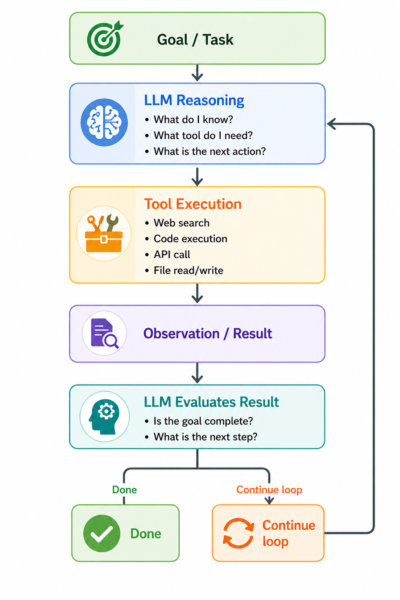
This perceive — reason — act — observe loop is the foundation of every AI agent, from a simple research assistant to a fully autonomous coding agent.
Core Components of an AI Agent
Before writing a single line of code, understanding the four building blocks will save you significant debugging time later.

1. The LLM Brain
The LLM is the reasoning engine. It reads the task, the available tools, and the history of actions taken so far, then decides what to do next. In 2026, the leading choices are OpenAI GPT-4o, Anthropic Claude 3.5 Sonnet, and Google Gemini 1.5 Pro. Each has different strengths in reasoning depth, tool-calling reliability, and context window size.
2. Tools
Tools are functions the agent can call to interact with the world. A tool can be anything with a defined input/output: a web search function, a Python code executor, a database query, a REST API call, or a file system operation. The LLM does not run tools directly — it outputs a structured tool call, your code executes it, and the result is fed back to the LLM as an observation.
3. Memory
Memory determines what the agent knows and remembers across steps. There are three types:
- In-context memory: the conversation history passed in each LLM call — fast but limited by context window size
- External memory: a vector database (Pinecone, Chroma, Weaviate) storing embeddings of past interactions, documents, or task results for retrieval
- Episodic memory: structured logs of past agent runs used to improve future planning
4. The Orchestration Layer
The orchestration layer manages the agent loop: sending prompts to the LLM, parsing tool call requests, executing tools, handling errors, and deciding when the task is complete. This is where frameworks like LangChain, LlamaIndex, and the Anthropic Agent SDK add the most value.
Frameworks Compared: Choosing the Right Tool

| Framework | Best For | Language | Key Strength |
|---|---|---|---|
| LangChain | General-purpose agents with many integrations | Python / JS | Largest ecosystem, 600+ integrations |
| LlamaIndex | RAG-heavy agents over large document corpora | Python | Best-in-class document retrieval and indexing |
| Anthropic Agent SDK | Production agents using Claude models | Python | Native Claude tool use, multi-agent orchestration |
| AutoGen (Microsoft) | Multi-agent conversations and collaboration | Python | Agent-to-agent communication patterns |
| CrewAI | Role-based multi-agent teams | Python | Intuitive role/task abstraction for agent crews |
| Bare API (no framework) | Simple single-task agents, learning exercises | Any | Full control, no abstraction overhead |
For a first agent, starting without a framework — just the OpenAI or Anthropic Python SDK — gives you the clearest understanding of what is actually happening. Once the fundamentals click, adopting LangChain or the Anthropic Agent SDK adds significant productivity.
How to Build Your First AI Agent in Python: Step-by-Step
This walkthrough builds a simple research agent that can search the web, read web pages, and produce a summarised answer to a research question. It uses the OpenAI API and Python.

Step 1: Set Up Your Environment
Create a virtual environment and install the required packages.
python -m venv agent-env
source agent-env/bin/activate  # Windows: agent-env\Scripts\activate
pip install openai requests beautifulsoup4 duckduckgo-search
Store your API key as an environment variable — never hardcode it in your script.
export OPENAI_API_KEY="your-api-key-here"Step 2: Define Your Tools
Tools are plain Python functions. The LLM needs a structured description of each tool to know when and how to call it.
from duckduckgo_search import DDGS

def web_search(query: str) -> str:
    """Search the web and return the top 5 results."""
    with DDGS() as ddgs:
        results = list(ddgs.text(query, max_results=5))
    return "\n".join(
        f"{r['title']}\n{r['href']}\n{r['body']}" for r in results
    )

tools = [
    {
        "type": "function",
        "function": {
            "name": "web_search",
            "description": "Search the web for current information on a topic.",
            "parameters": {
                "type": "object",
                "properties": {
                    "query": {"type": "string", "description": "The search query"}
                },
                "required": ["query"]
            }
        }
    }
]
Step 3: Build the Agent Loop
This is the core of the agent — a loop that calls the LLM, executes any tool it requests, feeds the result back, and repeats until the LLM signals it is done.
import json
from openai import OpenAI

client = OpenAI()

def run_agent(task: str) -> str:
    messages = [
        {"role": "system", "content": "You are a research assistant. Use the web_search tool to find accurate, up-to-date information. When you have enough information, provide a clear and concise answer."},
        {"role": "user", "content": task}
    ]

    tool_map = {"web_search": web_search}
    max_iterations = 10

    for _ in range(max_iterations):
        response = client.chat.completions.create(
            model="gpt-4o",
            messages=messages,
            tools=tools,
            tool_choice="auto"
        )
        message = response.choices[0].message
        messages.append(message)

        # No tool call — agent is done
        if not message.tool_calls:
            return message.content

        # Execute each tool call and return results
        for tool_call in message.tool_calls:
            fn_name = tool_call.function.name
            fn_args = json.loads(tool_call.function.arguments)
            print(f"  Calling tool: {fn_name}({fn_args})")

            result = tool_map[fn_name](**fn_args)
            messages.append({
                "role": "tool",
                "tool_call_id": tool_call.id,
                "content": result
            })

    return "Max iterations reached."

# Run it
if __name__ == "__main__":
    answer = run_agent("What are the most significant AI breakthroughs in the first half of 2026?")
    print("\nAnswer:\n", answer)
Step 4: Run and Observe
Run the script and watch the tool calls. You will see the agent decide to search for information, retrieve results, and synthesise an answer — the entire agentic loop visible in your terminal. This is the clearest way to develop intuition for how agents reason.
python agent.py
# Output:
#   Calling tool: web_search({'query': 'AI breakthroughs 2026 first half'})
#   Calling tool: web_search({'query': 'major AI models released 2026'})
#
# Answer:
# In the first half of 2026, the most significant AI developments include...
Step 5: Add Memory (Optional but Recommended)
For agents that need to remember context across multiple runs, add a simple file-based memory store or integrate a vector database. The simplest version: append a summary of each task and result to a JSON file, then include recent memories in the system prompt.
import json, os

MEMORY_FILE = "agent_memory.json"

def load_memory():
    if os.path.exists(MEMORY_FILE):
        with open(MEMORY_FILE) as f:
            return json.load(f)
    return []

def save_memory(task: str, result: str):
    memory = load_memory()
    memory.append({"task": task, "result": result[:500]})
    with open(MEMORY_FILE, "w") as f:
        json.dump(memory[-20:], f)  # keep last 20 entries
Real-World Use Cases for AI Agents
Automated Research and Competitive Intelligence
Agents can monitor industry news, scrape competitor websites, and produce daily briefings without human intervention. Marketing and strategy teams at companies including HubSpot and Salesforce have deployed internal research agents that aggregate signals across hundreds of sources and surface the most relevant insights each morning.

Autonomous Coding Assistants
Platforms like Cursor, Devin, and GitHub Copilot Workspace deploy agents that can read a codebase, understand a feature request, write code across multiple files, run tests, and iterate based on failures — often completing tasks that previously required hours of developer time in minutes.
Customer Support Automation
Intercom, Zendesk, and Freshdesk all offer AI agent tiers that go beyond FAQ retrieval. These agents access CRM data, check order status, process refunds via API calls, and escalate to human agents only when genuinely needed — handling 40 to 70% of inbound queries without human involvement.
Data Analysis Pipelines
Agents equipped with code execution tools (such as the OpenAI Code Interpreter) can accept raw data files, write and execute analysis code, interpret the results, and produce natural-language summaries — compressing an analyst workflow that might take hours into minutes.
Benefits vs Challenges of Building AI Agents
| Benefits | Challenges |
|---|---|
| Automates complex multi-step tasks that traditional scripts cannot handle | LLM hallucinations can cause incorrect tool calls or fabricated results |
| Adapts dynamically to unexpected situations within a task | Debugging is harder than traditional code — non-deterministic behaviour is inherent |
| Dramatically reduces time-to-completion for research and data tasks | API costs accumulate quickly with multi-step agents running many LLM calls |
| Can operate around the clock without human supervision | Runaway loops and incorrect assumptions can cause unintended side effects |
| Highly extensible — new tools can be added without retraining the LLM | Latency is higher than deterministic code due to LLM inference time |
| Frameworks like LangChain and CrewAI significantly reduce boilerplate | Prompt engineering for reliable tool use requires iteration and testing |
Key Tips and Warnings for Your First Agent
- Always set a max iteration limit. An agent without a loop guard can run indefinitely and rack up large API bills.
- Log every tool call and result. Without visibility into what the agent did, debugging failures is nearly impossible.
- Start with one tool. Agents with many tools early on often struggle to choose correctly. Add tools incrementally as you validate each one works reliably.
- Use structured outputs where possible. Ask the LLM to return JSON for tool inputs — it significantly improves parsing reliability.
- Test failure modes deliberately. Give your agent ambiguous tasks, tasks that require tools it does not have, and tasks where search returns no useful results. How it handles edge cases tells you more than the happy path.
Frequently Asked Questions
What is an AI agent in simple terms?
An AI agent is a software system that uses an LLM to autonomously plan and execute multi-step tasks. It perceives a goal, reasons about what steps to take, uses tools (like web search or code execution) to act, observes the results, and continues until the task is complete — without step-by-step human instruction.
How do I build an AI agent in Python?
The core steps are: choose an LLM provider (OpenAI, Anthropic, Google), define tools as Python functions with structured descriptions, build a loop that sends messages to the LLM, parses tool call requests, executes the tools, and feeds results back until the LLM signals completion. The code walkthrough in this guide covers all of these steps with working examples.
What is the best framework for building AI agents?
For beginners, starting with raw API calls (no framework) builds the clearest understanding. For production use, LangChain is the most feature-rich option, the Anthropic Agent SDK is best for Claude-based agents, and CrewAI excels for multi-agent team workflows. Choice depends on your specific use case and the LLM you prefer.
What is LangChain and do I need it to build an AI agent?
LangChain is an open-source framework that provides abstractions for building LLM-powered applications and agents. You do not need it — you can build fully functional agents with just the OpenAI or Anthropic SDK. LangChain adds value through its large library of pre-built tool integrations, memory modules, and agent templates that save significant development time.
How much does it cost to run an AI agent?
Costs depend on the LLM you use and the number of tool calls per task. A simple research agent using GPT-4o might cost $0.01 to $0.10 per task. More complex agents that make dozens of LLM calls can cost $1 or more per run. Setting max iteration limits, using smaller models for intermediate steps, and caching repeated tool results are the main cost control strategies.
What tools can an AI agent use?
An agent can use any tool you define as a function: web search, browser control, code execution, database queries, REST API calls, file read/write, email sending, calendar access, and more. The LLM does not execute tools directly — it requests tool calls in structured format, your code runs them, and results are returned as observations.
What is the difference between an AI agent and a chatbot?
A chatbot responds to messages and may answer questions, but it does not autonomously take multi-step actions. An AI agent can plan a sequence of steps, use external tools, observe outcomes, and adapt its approach — completing tasks that require interacting with multiple systems over multiple rounds, not just generating a response to a single prompt.
How do I prevent an AI agent from looping indefinitely?
Always implement a maximum iteration count in your agent loop and exit with an appropriate message if it is reached. Additionally, design your system prompt to instruct the agent to indicate when a task is complete, and monitor token usage across the conversation to catch runaway loops early.
What is agentic AI?
Agentic AI refers to AI systems that can autonomously pursue goals over extended sequences of actions, using tools, memory, and iterative reasoning — in contrast to static, single-turn AI interactions. The term captures the shift from AI as a question-answering system to AI as an active participant that can plan and execute complex workflows.
What LLM is best for building AI agents?
In 2026, GPT-4o (OpenAI), Claude 3.5 Sonnet (Anthropic), and Gemini 1.5 Pro (Google) are all strong choices for agent development. GPT-4o has the most mature tool-calling ecosystem. Claude models excel at complex reasoning and following nuanced instructions reliably. Gemini 1.5 Pro offers the longest context window. Many production agents use a mix, routing different task types to the model best suited for them.
Can I build a multi-agent system as a beginner?
It is possible but not recommended as a first step. Master single-agent patterns first — reliable tool use, memory, error handling — before introducing inter-agent communication. Frameworks like AutoGen and CrewAI make multi-agent systems more approachable once the fundamentals are solid, abstracting much of the coordination complexity.
Conclusion
Building your first AI agent is simpler than it looks from the outside, and more illuminating than almost any other way to learn modern AI development. The perceive — reason — act — observe loop is the mental model. Python functions are the tools. The LLM is the brain. Everything else is orchestration.
Start with the bare API approach in this guide — one tool, one loop, one task. Run it, watch what it does, break it deliberately, and fix it. Once you understand the fundamentals, frameworks like LangChain and the Anthropic Agent SDK will accelerate your path to production significantly.
The developers who will build the most valuable software in the next five years are those who understand not just how to call an LLM, but how to build systems that use LLMs to reason and act. This guide is your starting point.
Subscribe to the PetaFusion newsletter for practical AI development guides, framework deep-dives, and real-world agentic AI use cases delivered directly to your inbox.