Picture this: You’re browsing your favorite website, and instead of waiting several seconds for images to load, everything appears instantly. That seamless experience? It’s powered by something called a Content Delivery Network, or CDN for short. But what exactly is this technology that’s revolutionizing how we consume digital content?
In today’s hyper-connected world, where users expect lightning-fast loading times and businesses compete on milliseconds, understanding CDNs isn’t just helpful—it’s essential. Whether you’re a website owner, developer, or simply curious about the technology that powers your daily internet experience, this comprehensive guide will demystify everything you need to know about content delivery networks.
This is critical, because building a website is only the first step — true business success comes from how effectively you grow, optimize, and market it.
What is a CDN (Content Delivery Network)?
A Content Delivery Network (CDN) is a globally distributed system of servers designed to deliver web content to users with maximum speed and efficiency. Think of it as having multiple copies of your favorite book stored in libraries across different cities—when you need to read it, you simply go to the nearest library rather than traveling across the country to the original publisher.
At its core, a CDN serves as an intermediary between your website’s origin server (where your content originally lives) and your end users. Instead of every visitor having to fetch content from your single server location, the CDN strategically places copies of your content on multiple servers worldwide, known as edge servers or Points of Presence (PoPs).
The building blocks of CDN infrastructure
Modern CDNs are built from several core components that function seamlessly together:
Edge Servers: These are the workhorses of any CDN, strategically positioned in data centers around the globe. Every edge server holds cached copies of your site’s static assets, including images, CSS, JavaScript, videos, and more.
Origin Servers: This is your website’s primary server where the original content resides. When the CDN doesn’t have a cached version of requested content, it fetches it from here.
Caching Mechanisms: Sophisticated algorithms determine what content to cache, how long to store it, and when to refresh it with newer versions from the origin server.
How does a Content Delivery Network work?
Understanding how CDNs operate requires diving into the fascinating world of network optimization and intelligent routing. The process might seem complex, but it’s beautifully orchestrated behind the scenes.
The Journey of a Web Request
When you click on a website link, here’s what happens in the CDN ecosystem:
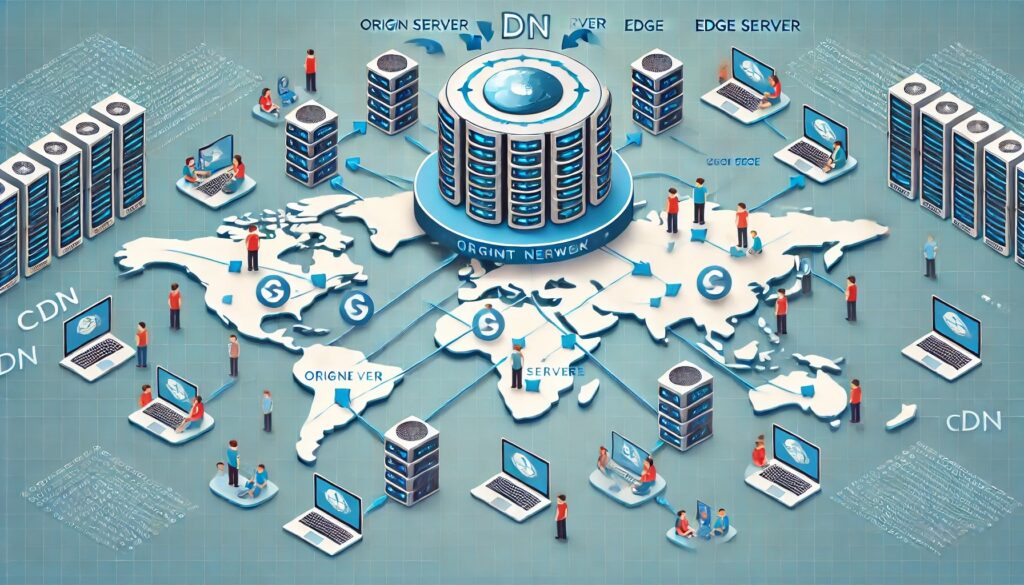
Step 1: When you visit a site, your browser initiates a request for its content. Instead of going directly to the origin server (which might be thousands of miles away), the request is intercepted by the CDN network.
Step 2: Intelligent Routing The CDN’s routing system analyzes several factors: your geographic location, current network conditions, server load, and content availability. It then directs your request to the most optimal edge server.
Step 3: Cache Check The selected edge server checks if it has a cached version of the requested content. If the content exists and is still fresh (based on predefined caching rules), it’s immediately served to you.
Step 4: Origin Fetch (if needed) If the content isn’t cached or has expired, the edge server fetches it from the origin server, caches it locally, and then delivers it to your browser.
Step 5: Content Delivery You receive the content, often within milliseconds, creating that smooth browsing experience you’ve come to expect.
Advanced CDN Technologies
Modern CDNs employ sophisticated technologies to optimize this process further:
Anycast Routing: This network addressing method allows multiple edge servers to share the same IP address, with internet routing protocols automatically directing users to the nearest available server.
Dynamic Content Optimization: While CDNs traditionally cached static content, today’s networks can also optimize dynamic content through techniques like connection pooling and route optimization.
Smart Compression: CDNs automatically compress content using algorithms like Gzip or Brotli, reducing file sizes without compromising quality.
Types of CDN Services
The CDN landscape offers various service models, each designed to meet different needs and budgets. Understanding these options helps you make informed decisions about which solution fits your requirements.
Push CDNs vs. Pull CDNs
Push CDNs require you to manually upload content to the CDN servers. You have complete control over when and what content gets cached, making this ideal for websites with infrequent content updates. However, this approach demands more hands-on management and storage costs can accumulate quickly.
Pull CDNs automatically fetch content from your origin server when users request it for the first time. This “lazy loading” approach requires minimal setup and works excellently for frequently updated websites. The trade-off is that the first visitor to request uncached content might experience slightly slower load times.
Public vs. Private CDNs
Public CDNs are shared infrastructure services offered by companies like Cloudflare, Amazon CloudFront, and Google Cloud CDN. They’re cost-effective, easy to implement, and benefit from massive scale. However, you’re sharing resources with other websites, which can occasionally lead to performance variations.
Private CDNs are dedicated networks built specifically for your organization. While significantly more expensive, they offer complete control, predictable performance, and enhanced security. Large enterprises with substantial traffic volumes often opt for this approach.
Specialized CDN Solutions
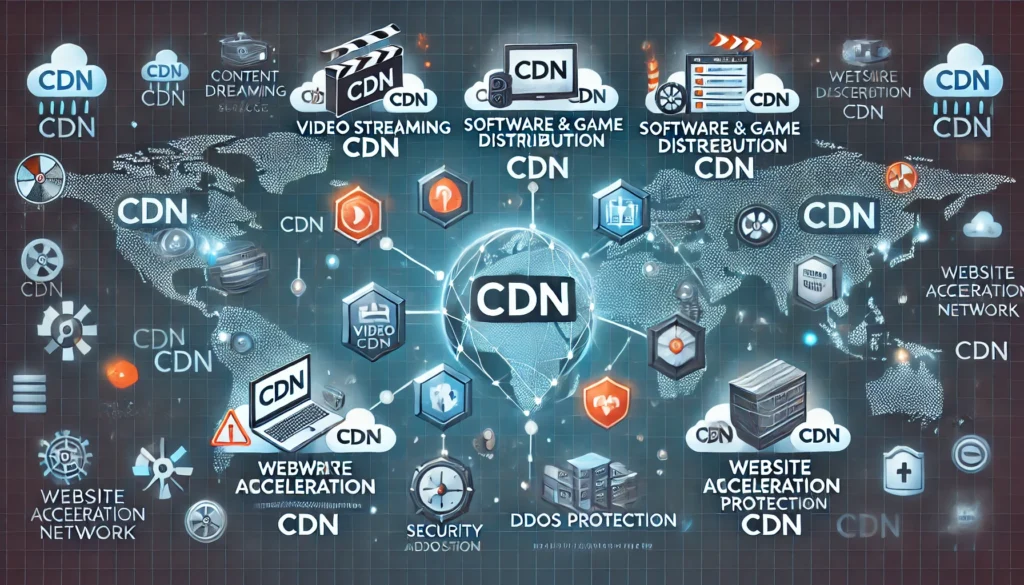
Video CDNs are optimized specifically for streaming content, offering features like adaptive bitrate streaming and real-time analytics.
Mobile CDNs focus on optimizing content delivery for mobile devices, considering factors like varying connection speeds and device capabilities.
Security-Focused CDNs combine content delivery with robust security features, including DDoS protection and web application firewalls.
Key Benefits of Using a CDN
The advantages of implementing a CDN extend far beyond simple speed improvements. Let’s explore the compelling reasons why businesses across all industries are embracing this technology.
Lightning-Fast Website Performance
Speed isn’t just about user convenience—it’s a critical business factor. Research consistently shows that even a one-second delay in page load time can result in significant drops in conversion rates and user engagement.
CDNs address this challenge by dramatically reducing latency—the time it takes for data to travel from server to user. By serving content from geographically closer locations, CDNs can reduce load times by 50% or more. This improvement is particularly noticeable for users located far from your origin server.
Enhanced User Experience
Beyond raw speed, CDNs contribute to overall user satisfaction in several ways:
Reduced Bounce Rates: Faster-loading websites keep visitors engaged, reducing the likelihood they’ll abandon your site before it fully loads.
Improved Mobile Experience: With mobile traffic comprising over half of all web traffic, CDNs’ ability to optimize content for mobile devices is invaluable.
Consistent Performance: CDNs provide more predictable loading times regardless of user location or network conditions.
Significant Cost Savings
While CDNs require an investment, they often result in substantial cost savings:
Bandwidth Reduction: By serving content from edge servers, CDNs reduce the load on your origin server, potentially lowering your hosting costs.
Infrastructure Efficiency: Instead of scaling your origin server infrastructure to handle global traffic, you can rely on the CDN’s distributed network.
Reduced Downtime Costs: CDNs’ redundancy features help prevent costly website outages.
Robust Security and Reliability
Modern CDNs offer comprehensive security features that protect your website and users:
DDoS Protection: CDNs can absorb and mitigate distributed denial-of-service attacks before they reach your origin server.
SSL/TLS Optimization: Many CDNs provide free SSL certificates and optimize encrypted connections for better performance.
Web Application Firewall (WAF): Advanced CDNs include firewall capabilities that filter malicious traffic and protect against common web vulnerabilities.
Global Scalability
CDNs make global expansion effortless. Whether you’re a startup planning international growth or an established business entering new markets, CDNs ensure consistent performance worldwide without requiring physical infrastructure in each region.
Popular CDN Providers and Their Features
The CDN market offers diverse solutions, from budget-friendly options to enterprise-grade services. Here’s an overview of leading providers and their distinctive features.
Cloudflare: The All-in-One Solution
Cloudflare has revolutionized the CDN space by offering a comprehensive platform that combines content delivery with security and performance optimization. Their free tier provides basic CDN services, making it accessible to small websites and personal projects.
Key Features:
- Global network with over 270 data centers
- Integrated security features including DDoS protection
- Advanced caching options and page rules
- Analytics and performance monitoring tools
Best For: Small to medium websites seeking an easy-to-implement solution with robust security features.
Amazon CloudFront: Enterprise-Grade Performance
As part of Amazon Web Services (AWS), CloudFront integrates seamlessly with other AWS services, making it a natural choice for businesses already using the AWS ecosystem.
Key Features:
- Integration with AWS services like S3 and EC2
- Advanced caching behaviors and origin request policies
- Real-time logs and detailed analytics
- Edge computing capabilities with Lambda@Edge
Best For: Enterprises using AWS infrastructure or requiring advanced customization options.
Google Cloud CDN: Intelligence-Driven Delivery
Google Cloud CDN leverages Google’s global infrastructure and machine learning capabilities to optimize content delivery dynamically.
Key Features:
- Integration with Google Cloud Platform services
- Anycast IP addresses for optimal routing
- HTTP/2 and QUIC protocol support
- Advanced security features and SSL optimization
Best For: Organizations prioritizing cutting-edge technology and integration with Google services.
QUIC.cloud: WordPress-First CDN Innovation
QUIC.cloud CDN is another key player in the content delivery network space with the ability to cache dynamic WordPress pages QUIC.cloud CDN | LiteSpeed Documentation, setting it apart from traditional CDNs that only handle static content. QUIC.cloud also supports HTTP/3 connections end to end, from client browser to backend server QUIC and HTTP/3 Library Service – QUIC.cloud.
Key Features:
- Cache your entire WordPress site at the CDN level LiteSpeed Cache Service – QUIC.cloud – including dynamic HTML pages
- HTTP/3 internet protocol with less than 10ms average latency in North America and Europe Explore Our Optimized Services and Features – QUIC.cloud
- Layer-7 DDoS protection, WordPress Brute Force protection, CDN-level reCAPTCHA QUIC.cloud CDN – MechanicWeb
- Image optimization, cutting-edge security QUIC.cloud – Accelerate, Optimize, Protect your WordPress and critical CSS generation
- Global coverage with a growing network of 84 PoPs Explore Our Optimized Services and Features – QUIC.cloud
Best For: WordPress sites seeking cutting-edge performance optimization, especially those already using LiteSpeed hosting or wanting advanced dynamic content caching capabilities.
Other Notable Providers
KeyCDN: Known for competitive pricing and straightforward implementation. MaxCDN (now StackPath): Focuses on ease of use and excellent customer support. Fastly: Offers real-time configuration changes and advanced edge computing capabilities.
How to Choose the Right CDN for Your Needs
Selecting the optimal CDN requires careful consideration of your specific requirements, technical constraints, and business objectives. Here’s a framework to guide your decision-making process.
Assess Your Performance Requirements
Start by understanding your current performance baseline and identifying areas for improvement:
Traffic Patterns: Analyze your website analytics to understand where your users are located geographically and during which time periods they’re most active.
Content Types: Different CDNs excel at different content types. If you serve primarily video content, prioritize CDNs with strong streaming capabilities.
Performance Goals: Define specific targets for page load times, time to first byte (TTFB), and other performance metrics.
Evaluate Technical Compatibility
Ensure the CDN integrates smoothly with your existing infrastructure:
CMS Compatibility: Verify that your content management system (WordPress, Drupal, etc.) works well with your chosen CDN.
SSL Requirements: If you need SSL certificates, determine whether the CDN provides them or if you need to bring your own.
API Access: Consider whether you need programmatic control over CDN settings through APIs.
Consider Budget and Pricing Models
CDN pricing varies significantly based on usage patterns and features:
Traffic-Based Pricing: Most CDNs charge based on the amount of data transferred. Request-Based Pricing: Some providers charge per request rather than bandwidth. Feature-Based Tiers: Consider which features you actually need to avoid paying for unnecessary capabilities.
Security and Compliance Requirements
Evaluate security features based on your industry and regulatory requirements:
Compliance Certifications: Ensure the CDN meets relevant standards (SOC 2, PCI DSS, HIPAA, etc.). Geographic Restrictions: Some industries require data to remain within specific regions. Advanced Security Features: Consider whether you need WAF, bot protection, or advanced threat detection.
Implementation Best Practices
Successfully deploying a CDN involves more than simply signing up for a service. Following proven best practices ensures you maximize the benefits while avoiding common pitfalls.
Content Optimization Strategies
Cache-Friendly Content Structure: Organize your website to separate static and dynamic content clearly. Static assets (images, CSS, JavaScript) should be easily cacheable, while dynamic content should be optimized for efficient delivery.
Proper HTTP Headers: Configure appropriate cache-control headers to guide CDN caching behavior. Set longer expiration times for rarely-changing assets and shorter times for frequently updated content.
Image Optimization: Implement responsive image techniques and consider next-generation formats like WebP or AVIF for better compression and quality.
Configuration Best Practices
Origin Server Optimization: Ensure your origin server is properly configured to handle CDN requests efficiently. This includes optimizing server response times and implementing proper caching strategies.
SSL Configuration: Properly configure SSL certificates and consider using HTTP/2 for improved performance over encrypted connections.
Monitoring and Analytics: Set up comprehensive monitoring to track CDN performance, cache hit rates, and identify optimization opportunities.
Testing and Validation
Performance Testing: Use tools like GTmetrix, Pingdom, or WebPageTest to measure performance improvements after CDN implementation.
Global Testing: Test your website’s performance from various geographic locations to ensure the CDN is working effectively worldwide.
Functionality Testing: Verify that all website features work correctly through the CDN, paying special attention to dynamic content and interactive elements.
Common CDN Challenges and Solutions
While CDNs offer tremendous benefits, implementation can present challenges. Understanding these potential issues and their solutions helps ensure a smooth deployment.
Cache Management Complexities
Challenge: Ensuring users receive updated content when you make changes to your website.
Solution: Implement proper cache invalidation strategies. Most CDNs offer purge APIs that allow you to clear cached content automatically when updates occur. Consider implementing cache versioning for assets that change frequently.
Dynamic Content Optimization
Challenge: Traditional CDNs excel at static content but can struggle with personalized or frequently changing content.
Solution: Modern CDNs offer edge computing capabilities that can process dynamic requests closer to users. Alternatively, implement smart caching strategies that cache dynamic content for short periods or based on user segments.
Cost Management
Challenge: CDN costs can escalate quickly with high traffic volumes or inefficient usage patterns.
Solution: Monitor usage patterns regularly and optimize caching strategies to improve cache hit ratios. Consider implementing cost controls and alerts to prevent unexpected charges.
Security Considerations
Challenge: Ensuring the CDN doesn’t introduce security vulnerabilities or compromise existing security measures.
Solution: Regularly review CDN security configurations, implement proper access controls, and ensure SSL/TLS settings meet your security requirements.
CDN Performance Monitoring and Analytics
Effective CDN management requires ongoing monitoring and optimization. Understanding key performance indicators and using appropriate tools helps maximize your CDN investment.

Key Metrics to Monitor
Cache Hit Ratio: This measures the percentage of requests served from cache versus those requiring origin server access. Higher ratios indicate better performance and cost efficiency.
Time to First Byte (TTFB): Measures how quickly the CDN begins delivering content after receiving a request. Lower TTFB values indicate better performance.
Origin Offload: Tracks how much traffic the CDN handles versus your origin server, indicating the effectiveness of your caching strategy.
Error Rates: Monitor 4xx and 5xx error rates to identify potential issues with content delivery or origin server health.
Analytics Tools and Platforms
Built-in CDN Analytics: Most CDN providers offer comprehensive analytics dashboards showing traffic patterns, performance metrics, and cost breakdowns.
Third-Party Monitoring: Tools like New Relic, Datadog, or Pingdom provide additional insights and can help correlate CDN performance with overall website metrics.
Real User Monitoring (RUM): Implement RUM tools to understand actual user experience rather than synthetic testing results.
Final Thoughts..
Content Delivery Networks have evolved from a luxury for large enterprises to an essential tool for anyone serious about web performance and user experience. As we’ve explored throughout this guide, CDNs offer compelling benefits that extend far beyond simple speed improvements—they provide enhanced security, global scalability, cost optimization, and the foundation for modern web experiences that users expect.
The key to CDN success lies in understanding your specific needs, choosing the right provider, and implementing best practices that align with your technical requirements and business objectives. Whether you’re running a personal blog, an e-commerce platform, or a global enterprise application, there’s a CDN solution that can significantly improve your website’s performance and your users’ experience.
As internet usage continues to grow globally and user expectations for speed and reliability increase, CDNs will only become more critical to digital success. The websites and applications that thrive in the coming years will be those that leverage these powerful networks to deliver exceptional experiences regardless of where their users are located.
Remember, implementing a CDN isn’t just about keeping up with technology trends—it’s about providing value to your users, improving your business metrics, and building a foundation for sustainable growth in an increasingly connected world.
Frequently Asked Questions (FAQ)
- What is a CDN and how does it work?
- A: A Content Delivery Network (CDN) is a distributed network of servers that delivers web content to users from the geographically closest server location. It works by caching website content on multiple servers worldwide, reducing loading times and improving user experience.
- How much does a CDN cost?
- A: CDN costs vary widely based on usage, features, and provider. Basic services can start from free (like Cloudflare’s basic tier) to hundreds or thousands of dollars monthly for enterprise solutions. Most providers charge based on bandwidth usage, typically ranging from $0.08 to $0.20 per GB.
- Do I need a CDN for my small website?
- A: Even small websites can benefit from CDNs, especially if they serve users globally or contain media-rich content. Many CDN providers offer free or low-cost tiers perfect for small websites, providing immediate performance improvements and basic security features.
- What types of content can CDNs cache?
- A: CDNs can cache various content types including images, videos, CSS files, JavaScript, HTML pages, downloadable files, and streaming media. Modern CDNs can also optimize dynamic content through edge computing and intelligent routing.
- How long does it take to set up a CDN?
- A: Basic CDN setup can be completed in minutes to hours, depending on your website’s complexity. Simple implementations might only require updating DNS settings, while complex configurations with custom rules and integrations may take several days to fully optimize.
- Can CDNs improve SEO rankings?
- A: Yes, CDNs can positively impact SEO by improving page load speeds, which is a confirmed Google ranking factor. Faster websites also tend to have lower bounce rates and better user engagement metrics, indirectly supporting SEO performance.
- What’s the difference between CDN and web hosting?
- A: Web hosting provides the server where your website files are stored and processed, while a CDN distributes copies of your content across multiple global locations for faster delivery. CDNs complement web hosting rather than replace it.
- How do CDNs handle website security?
- A: Modern CDNs offer various security features including DDoS protection, Web Application Firewalls (WAF), SSL/TLS encryption, bot protection, and threat intelligence. They act as a shield between your origin server and potential threats.
- Can I use multiple CDNs simultaneously?
- A: Yes, multi-CDN strategies are becoming increasingly popular for large-scale applications. This approach provides redundancy, optimizes costs, and can improve performance by leveraging the strengths of different CDN providers.
- What happens if a CDN goes down?
- A: Reputable CDN providers have redundancy measures in place. If one edge server fails, traffic is automatically routed to other available servers. Many CDNs also offer automatic failover to your origin server if their entire network experiences issues.
- How do CDNs affect website analytics?
- A: CDNs can impact analytics if not properly configured. Ensure your analytics tracking codes are correctly implemented and consider using server-side analytics integration to maintain accurate visitor data and geographic information.
- Are there any disadvantages to using CDNs?
- A: Potential drawbacks include additional complexity in website management, possible increased costs for high-traffic sites, dependency on third-party services, and potential issues with real-time content updates. However, these are generally outweighed by the benefits for most websites.